
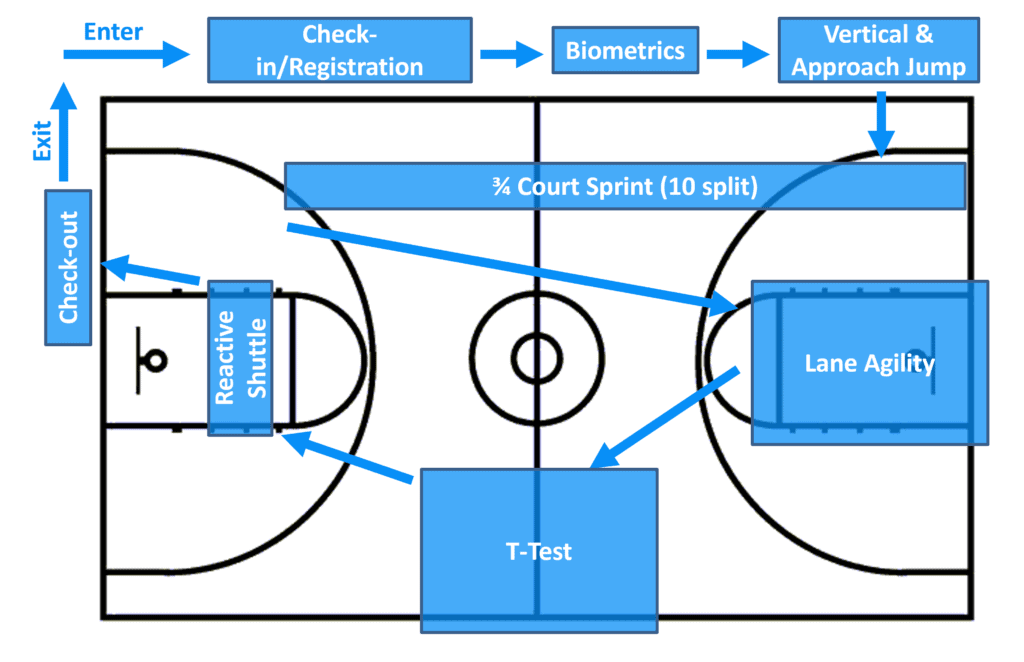
Set-up and instructions
Using Dashr equipment and software you can streamline athlete registration, performance testing, data collection/storage, and report generation. We are a one stop shop for these events and have been a pivotal part of dozens of testing organizations including all the Under Armour Next Gen, Football University, and ESPN Top 300 camps and combines as well as dozens of basketball camps (and other sports) across the country – so we have a bit of experience in having things flow nicely.
See our post How to run a Basketball Combine with Dashr for full step-by-step instructions!
Common Basketball Combine Drills
- Biometric Measurements
- Vertical Jump
- 3/4 Court Sprint with 10 Split
- Lane Agility
- T-Test
- Reactive Agility
Equipment and Software
We have put together a package for baseball combine testing. It includes everything for testing all the drills listed here.
Each athlete requires a Roster Spot to follow these steps and have the data saved and stored electronically. 500 Roster Spots are included in our Basketball Combine Package, more can be purchased through our Dashboard, on our website, or through one of our distributors. Roster Spots are OPTIONAL when using the Dashr system, but without them you would need to write down results manually. The instructions outlined here are assuming you have Roster Spots. You will want to make sure you have enough for the athletes you expect to show up, along with a buffer for walk-up. When you purchase Roster Spots directly from the Dashboard they are automatically credited to your account without delay.
From $3,975