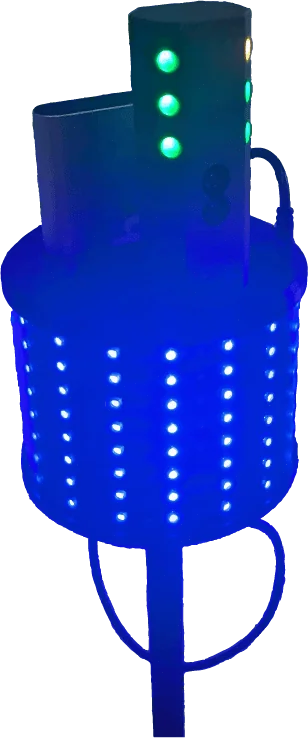
The Dashr 360 display is used to display either time or speed, but it can also be used as a reaction light in our reactive drills – such as the Reactive Shuttle and the Reactive Agility Test (RAT or Y-Test).
- Register the display in the app.
- Set it up on a tripod.
- Connect it to a drill.
- Everyone can see live results!
Register the display in the app.
The Dashr 360 display registers in the app just like your Silver or Blue lasers using the “Add Device” button at the top of the main page in the app. Power on your displays one at a time and assign them a number/ID of your choosing. There is a space to write the number on the bottom of the display.
To power on the display use the included USB A-C cable and connect the USB battery to the display. The slot on the 360 display is designed for you to slide in the batter with the USB ports down. You can then use the cable to power on the display.
Set it up on a tripod.
The Dashr 360 display case includes a mini tripod and monopod for each display. Simply attach the two together then screw on the display and extend the tripod by loosening the nobs and re-tightening when you have it to your desired length.
Connect it to a drill.
When connecting your lasers or other tech on the drill connection page, there will be the option to connect a display. With the 360 display powered on, select it from the drop down menu and press connect. When connected, green square present on the display.
Everyone can see live results!
Perform your drill/test and get instant feedback on your 360 display!
Using the 360 display with a Silver laser.
The Dashr 360 display is designed to hold a Silver laser in order to reduce the amount of equipment on the field. Simply run a USB A-C cable through the slot by the battery, place the Silver laser in the indention for it on the top of the display, and connect the cable to both the battery and the Silver laser.
Using the 360 displays as a reaction device.
The 360 displays are interchangeable with the Dashr React modules. So, you can connect your 360 displays in a reaction drill to have a larger, more visible, reaction light! Select the reaction drill, connect your lasers, and connect your displays as React devices.